How to access on Fynd Commerce
Commerce Panel → Sales Channel (select application) → Search → Keywords
Here, you can assign a word or a group of words to a specially curated list of items. Your customers will get the desired search result by simply entering the keyword on your website.
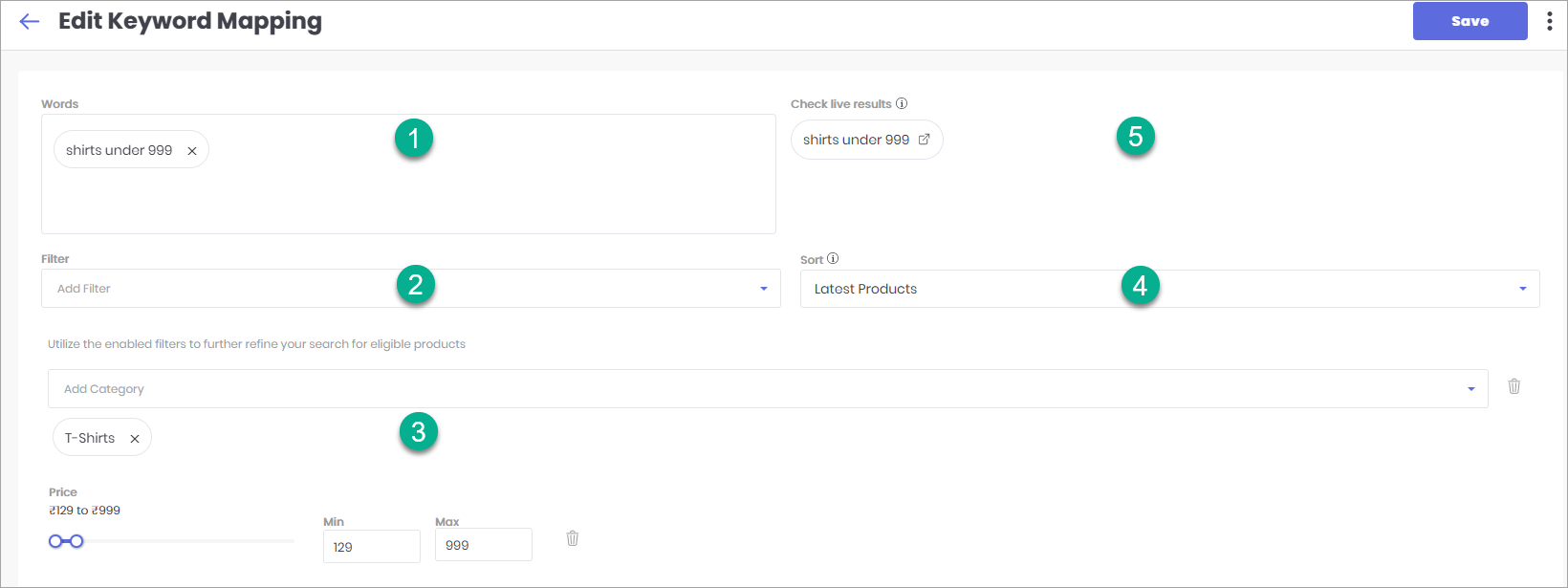
To set this up, click Create keyword. You’ll then be able to configure it using the following options:
- Words - You can assign more than one keyword. A keyword can be any word or a group of words, e.g., shirts under 999, smartphones with 16MP camera, etc.
- Filter - Here, you should choose one or more filters to find the desired products, e.g., category filter, price filter, department filter, etc.
- Configuring the filter - Enter or choose the filter value. For example, in price filter type 999, in category filter choose T-shirts.
- Sort - Choose the default sorting method for the search results, e.g., High Price to Low Price.
- Test your keyword - Save the keyword mapping and test it live. Check how the keyword will work for your customers.