These are the most commonly asked FAQs regarding product listing on Flipkart. They are divided into 3 categories as shown below.
Product Creation FAQs
What are the requirements for creating a product catalog?
- Gather all your product data.
What are the Image guidelines for Flipkart?
- Images must meet the following requirements:
| Paramater | Short Description | Long Description |
|---|---|---|
| Resolution | Minimum image quality | All the images should have minimum image resolution of 200x1000. |
| Format | JPEG | Only JPEG file format is allowed |
| Background | White/light Grey | Primary Image should be in white background |
| Subjective Guidelines | Tags | Images should not contain price tag, stickers or the product tag |
| Image Quality | Image Quality | Images should not be cropped, extended or elongated |
| Image Quality | Image Quality | Blurred, pixelated images are not allowed |
| Image Quality | No part of the product must be out of focus | |
| Props | no additional props | Solo product should be displayed without additional props |
| Illustrations | No text/watermark are allowed in the image | |
| Subjective Guidelines | Celebrity images | Photoshopped images of celebrities are not allowed on products |
| Subjective Guidelines | Image shouldn’t contain any offensive or objectionable items | |
| Comparison | no comparison with other brands | Image should not contain ratings and comparison with other brands |
| Minimum Images | Minimum number of required images | Minimum 2 images are required |
What are the minimum and the maximum number of images allowed by Flipkart?
Minimum 2 and Maximum of 5 images are allowed. You can arrange the order after uploading. Number of images will differ as per category.What is the image dimension supported by Flipkart?
All the images should have minimum image resolution of 200x1000. It's good if the image dimension is 1000 x 1000 pixels.How to upload the image on Flipkart?
We can upload the images through the Flipkart template to put the URL.How to do bulk listings on Flipkart?
Step 1- In Seller Central, click on Add New Listing under Listing. → Select Vertical, Brand and Download the Template
- Prepare your bulk Excel file with attributes
- In Seller Central, click on Add New Listing under Listing, Select Vertical, Brand, Add Product Info. → Click on Browse For XLS → Select the prepared excel sheet and upload
- Go to the Bulk Listing for Upload History to Monitor Upload Status → Check the upload file status
- Click on Error number under QC Failed, then click on Correct Errors, then click on Request to get the error file.
How to create product variants?
In Flipkart, product variant should be created based on size and color and its grouping based on style code and group id- Style Code is an alphanumeric code which is given to a product and can be found on the tag or packaging. Style Code remains the same for all Size variants and changes for all Color variants. For example, a red colored product that comes in three different sizes will have the same Style Code. → Group ID refers to a seller given intention to group products of the same design together on product page. For example, group ID will remain the same across size and color variants of a unique design.
How many variation types are supported by Flipkart?
Variation themes differ by category, so you'll need to download the respective category templates and choose a Variety theme from the dropdown listHow do I contact seller support?
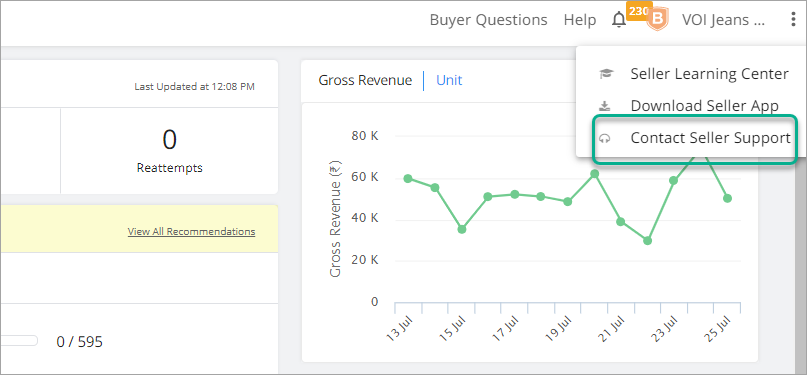
Go to the Right side top and click on Help center, Then click on Contact Seller Support
→
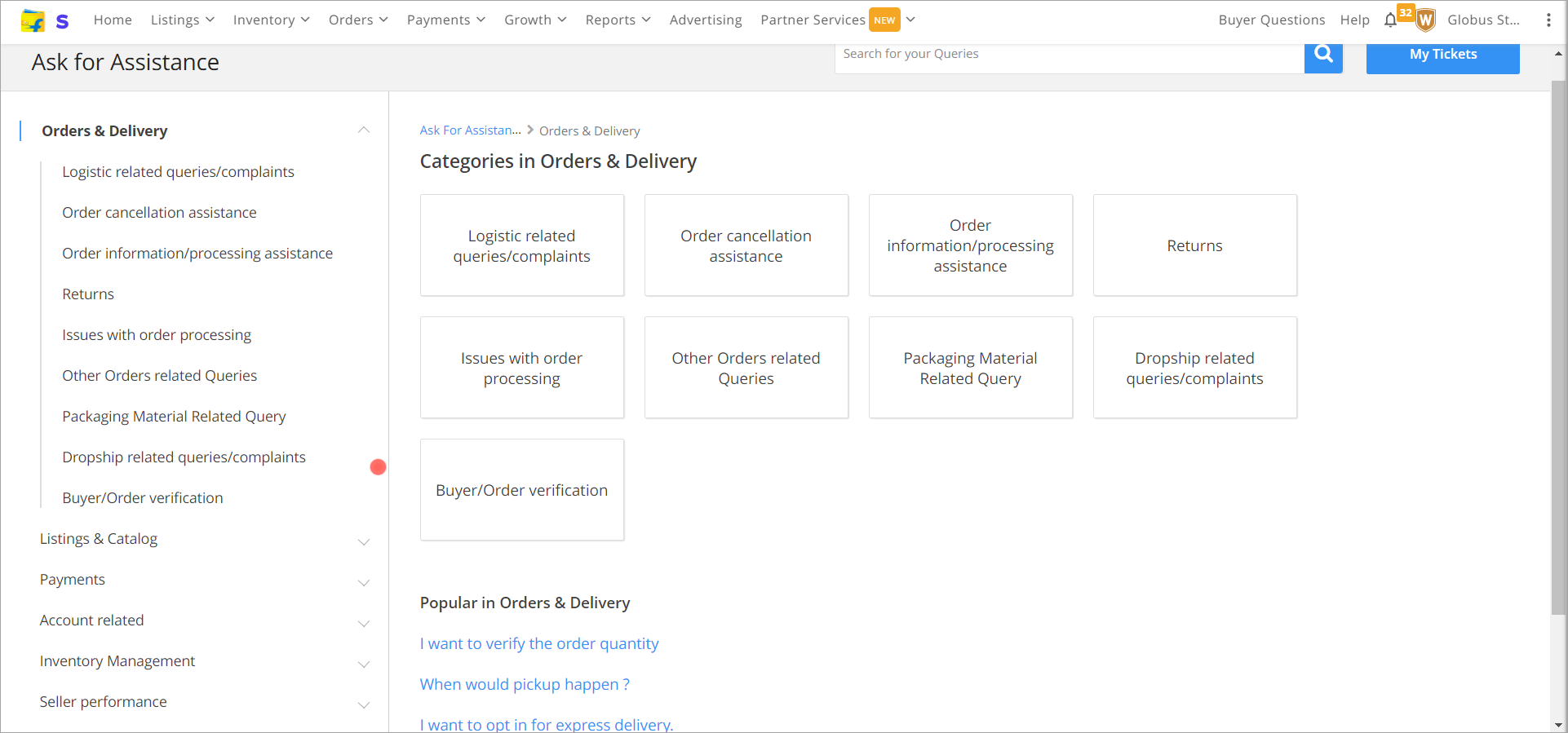
Chose your queries available in dropdown list and raise a ticket to support team
Can we create a duplicate product listing on Flipkart?
Flipkart does not support duplicate listing, If you have multiple identical units of the same product, use the quantity field. → If you try to list a duplicate product, you will get this type of error “[Seller SKU ID]: This SKU ID is already listed against another listing.; [sku_id]: This SKU ID is already listed against another listing.;”.
How to register the brand on Flipkart?
Documents Required for Flipkart Seller Registration
Documents Required for Flipkart Seller Registration
- Logo & brand name → Product image & it’s MRP → All sides images of product → Trademark certificate → Brand authorization letter(from brand owner) → Copy of invoice (purchase bill)(for retailers) → Copy of Category-specific government license (E.g., FSSAI) → Purchase bill of raw materials (for a manufacturer)
Eligibility to Register with Flipkart Brand Registry
- Name of the seller → Phone number of the seller → The Email address of the seller → Business address/ Pickup address → Classification of product → Tax registration documents such as certificate of incorporation, Memorandum of Association, etc.
Is there any way to list a product if a similar product is already listed on Flipkart?
Flipkart does not support the similar product listing for another seller.What is FSN, Listing ID, SKU ID. How are these related to each other?
A FSN is a way in which a product is identified in Flipkart catalog. It is a unique number for all the products. When you are trying to sell a product in Flipkart catalog, you get a Listing ID or a LID for it. The way you identify this is Seller SKU IDCan I change my SKU ID provided for a listing?
No, once you have provided an SKU ID for a listing you will not be allowed to change it. Hence, please be sure that you are doing this without any mistakesWhat is fulfillment type?
On flipkart you can sell your products from various fulfillment modes.- You can sell the product from your own warehouse/seller location. To do so you can select the 'seller' fulfillment type. → You can also sell from your location while maintaining inventory using Flipkart norms. You can select this using 'seller smart' fulfillment type. You get an advantage of getting an F-Assured tag for such listings → You can also sell from Flipkart warehouse location. You can select this using 'Flipkart' fulfillment type.
Important Note: If you select 'Flipkart', 'seller smart' or 'Flipkart and seller smart' fulfilment type, you end up getting F-Assured tag (if you meet the quality guardrails) which can improve your conversion. However, your shipping fees are limited to INR 40, for products below 500 and your proc_sla is limited to 2 hours (you need to process orders on the same day of getting them)
Can I as a seller select any fulfillment types for my listing?
All sellers can sell using 'seller' fulfillment type. However, you need to be onboarded to 'seller smart' and 'Flipkart' fulfillment type in order to select them for your listings. If you wish to use them please contact seller support for more detailsWhat is shipping provider? What value can I choose for my listings?
Once you get orders they need to be delivered to the customer. The deliveries are mostly handled by Flipkart and in some cases they can be done by the seller. If you wish to get your deliveries done by Flipkart select the option 'FLIPKART'. In case you wish to do deliveries yourself, you can select 'SELLER'. If you wish to select this shipping mode you will have to reach out to Seller SupportWhat is HSN code and GST Tax Rate? Where are the used?
HSN and GST tax rate help us understand the tax slab in which your product is sold. This helps us to generate appropriate invoice on your behalf for the customer. Selecting the rights GST and HSN code for your listing is your responsibilityWhat is 'Flipkart Plus' listing?
Flipkart identifies its best customers as Flipkart Plus customers. These customers have a higher conversion and shop more on the website/app. By making your listing a 'Plus Listing' you offer these customers free shipping for the listing. Non-Plus customers will continue to see the shipping rate put by you. → Please note: Your F-Assured listings have shipping fees discounted to zero for all plus customers
What is manufacturing date and Shelf life (in months)? Is it used for all listings?
Certain listings are marked as perishable listings because the product comes with an expiry date. Food products, batteries etc. are example of such product categories. In such product categories it is imperative to show the expiry date and manufacturing date to the customers. We expect you to provide manufacturing date and shelf life for such listings. Expiry Date is calculated by Flipkart as 'Manufacturing Date + Shelf Life'How to latch on to listings on Flipkart?
Watch the following videoProduct Updation FAQs
How to download the existing SKU data in Flipkart
In Seller, under listing Management click
→ Click on All Listing → Click on Request Download > Select Listing file from drop down → Then click on Download ready (Download the file if file generation is done)
How to add new variants for existing products?
Flipkart doesn't allow creation of a variation for an existing product, we need to create it at the time of making the catalog sheetHow to delete the variants for existing products?
Flipkart does not allow to delete variation for existing product, we need to deactivate that product listing
How to add/update image for existing products?
You can put the image URL in the in Flipkart templates for existing sku save the sheet and upload on seller panel via Upload your Product Catalog UploadCommon Errors while Listing
At the time of cataloging some time you will face Rejection in listing (QC), download the rejected file and see the Remark column for error. You need to correct that error and upload again for catalogInclude meanings of key attributes which are more prone to error
[Seller SKU ID]: This SKU ID is already listed against another listing.; [sku_id]: This SKU ID is already listed against another listing:- The seller SKU code already exist or listing on seller panel, You have to change in SKUs code and reupload the file on seller portal
- If you are getting FSN error that mean product already listed with this FSN code, you can modify the details only. For modify the details you have to search FSN code and download the listing file and update the correction in data and upload on seller panel
- If you are getting this error that mean product is QC passed and pending to live, You have to check the status with the FSN code and update the required information and upload on the seller panel
- You have to check the your dropship status is enabled or not on seller panel