Fynd Konnect's event-driven notification system enables real-time order and return updates to your OMS, WMS, ERP, or POS systems whenever critical state changes occur for a shipment in Fynd Commerce. Instead of relying on periodic API polling, our notification system pushes shipment data instantly to your configured endpoints, significantly reducing latency and improving operational efficiency.
- Instant Data Sync: Your systems receive updates immediately instead of waiting for scheduled cron jobs or manual polling intervals
- Reduced Latency: Process orders faster by receiving notifications the moment they are placed, invoiced, canceled, or dispatched
- Lower Server Load: Eliminate continuous API polling, reducing infrastructure costs and API rate limit concerns
- Event-Driven Architecture: Build reactive systems that respond instantly to order lifecycle changes
- Improved Customer Experience: Faster order processing translates to quicker fulfillment and delivery times
Configure notification subscriptions for any of the following order lifecycle events:
| Event Trigger | Event Description | Equivalent GET Orders' orderStatus query param |
|---|---|---|
new | Upcoming order on Fynd OMS | CREATED |
placed | Order placed by customer on storefront or marketplace and received by Fynd | CREATED |
cancelled_customer | Order canceled by customer before store confirmed fulfillment | CANCELLED |
cancelled_fynd | System-initiated cancellation by Fynd (e.g., inventory mismatch, business rules) | CANCELLED |
store_reassigned | Order reassigned to alternate fulfillment location due to the lack of inventory in the original fulfillment location | CREATED |
bag_confirmed | Store/warehouse confirms order after inventory check and begins picking | CONFIRMED |
bag_invoiced | Invoice generated for the packed order | PROCESSING |
dp_assigned | Delivery partner (courier) assigned to the order | PROCESSING |
bag_packed | Packing complete; bag is boxed and ready for courier pickup | COMPLETED |
handed_over_to_dg | Package handed over to delivery group/logistics network (when aggregator sends dispatch call via Order Dispatch API) | TRANSIT |
bag_picked | Courier picks up packaged order from store (when Fynd marks dispatched after receiving bag-pick call from delivery partner) | TRANSIT |
delivery_done | Bag successfully delivered to customer | DELIVERED |
return_initiated | Customer initiates return request after delivery | RETURN_PROCESSING |
return_in_transit | Return package picked up by courier and in transit back to store | RETURN_PROCESSING |
return_bag_delivered | Return package arrived back at store/warehouse | RETURN_DELIVERED |
return_accepted | Return stockpoint accepts return bag after QC | RETURN_COMPLETED |
rto_initiated | Return-to-origin process initiated by courier due to failed delivery | RETURN_PROCESSING |
rto_in_transit | RTO shipment in transit back to origin store/warehouse | RETURN_PROCESSING |
rto_bag_delivered | RTO package delivered back to store/warehouse | RETURN_DELIVERED |
rto_bag_accepted | Store/warehouse accepts RTO package after QC | RETURN_COMPLETED |
credit_note_generated | Credit note (reverse invoice) generated after successful return or RTO acceptance | CREDIT_NOTE_GENERATED |
- Event Occurs: Order state changes in Fynd OMS (e.g.,
bag_confirmed→bag_invoiced) - Notification Triggered: Fynd Konnect sends a POST request with shipment payload to your configured endpoint
- Your System Processes: Your OMS/WMS/ERP/POS receives and processes the data in real-time
- Response: Your endpoint returns a success status to acknowledge receipt
- HTTP Method:
POST - Headers:
- Optional: Custom authentication headers (if configured)
- Payload: Complete Fynd Konnect order payload in JSON format
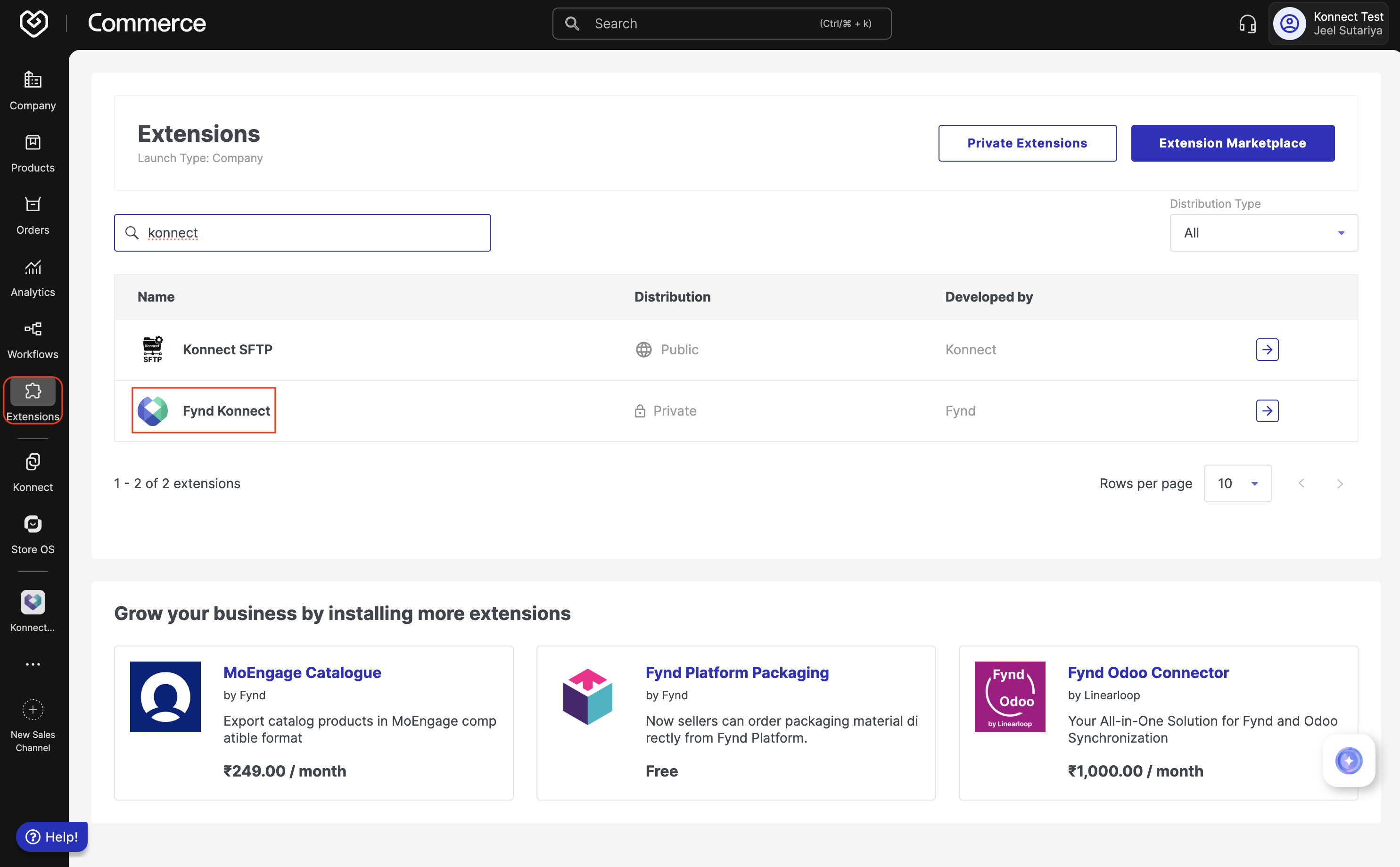
- Access Fynd Konnect Channel: Navigate to your Fynd Commerce panel and click Extensions from the left sidebar. Locate and click Fynd Konnect from the channels list.
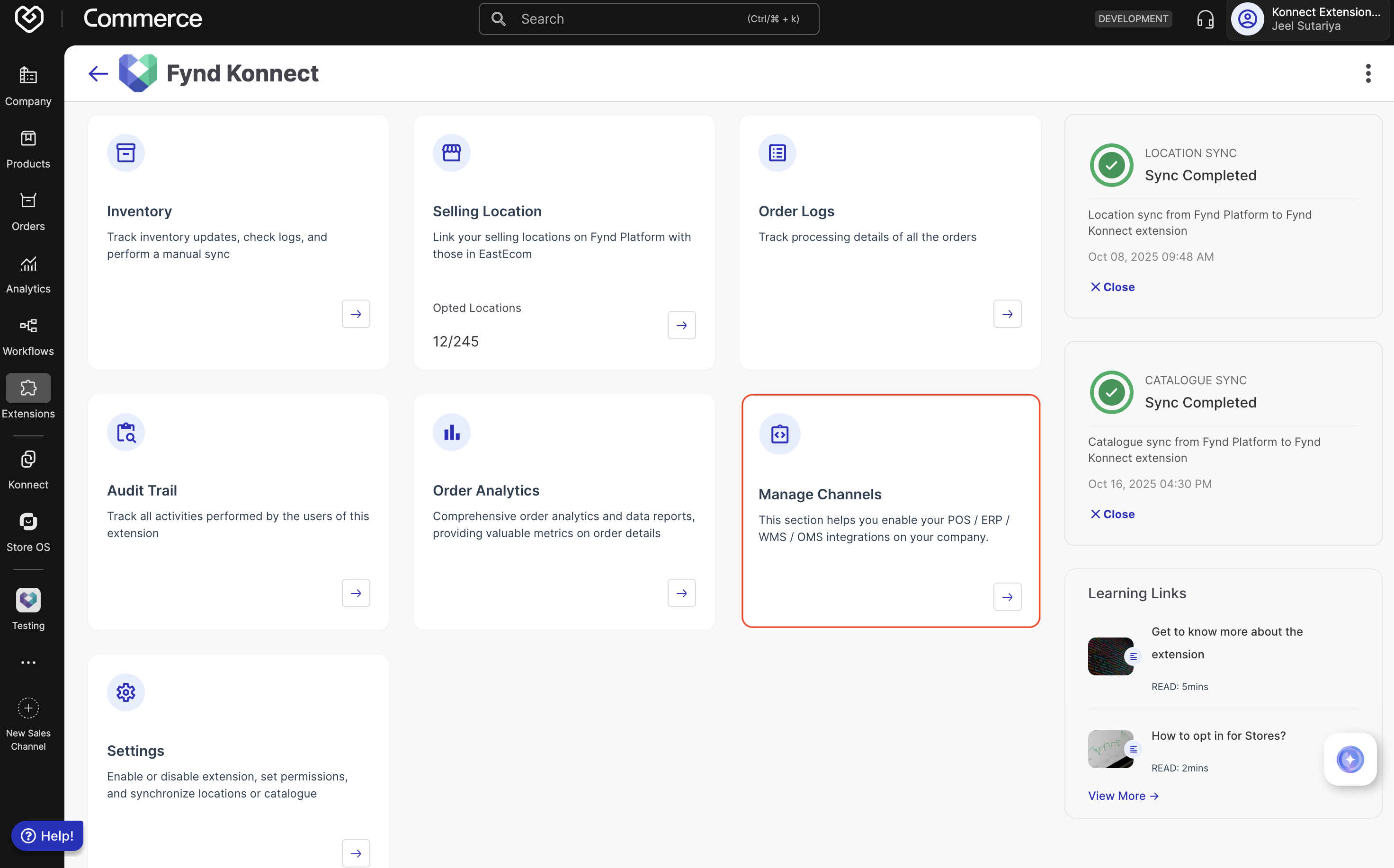
- Manage Channels: From the Fynd Konnect dashboard, click Manage Channels to view all configured seller channels.
To create a new OMS/WMS/ERP/POS channel, contact the Fynd Konnect team
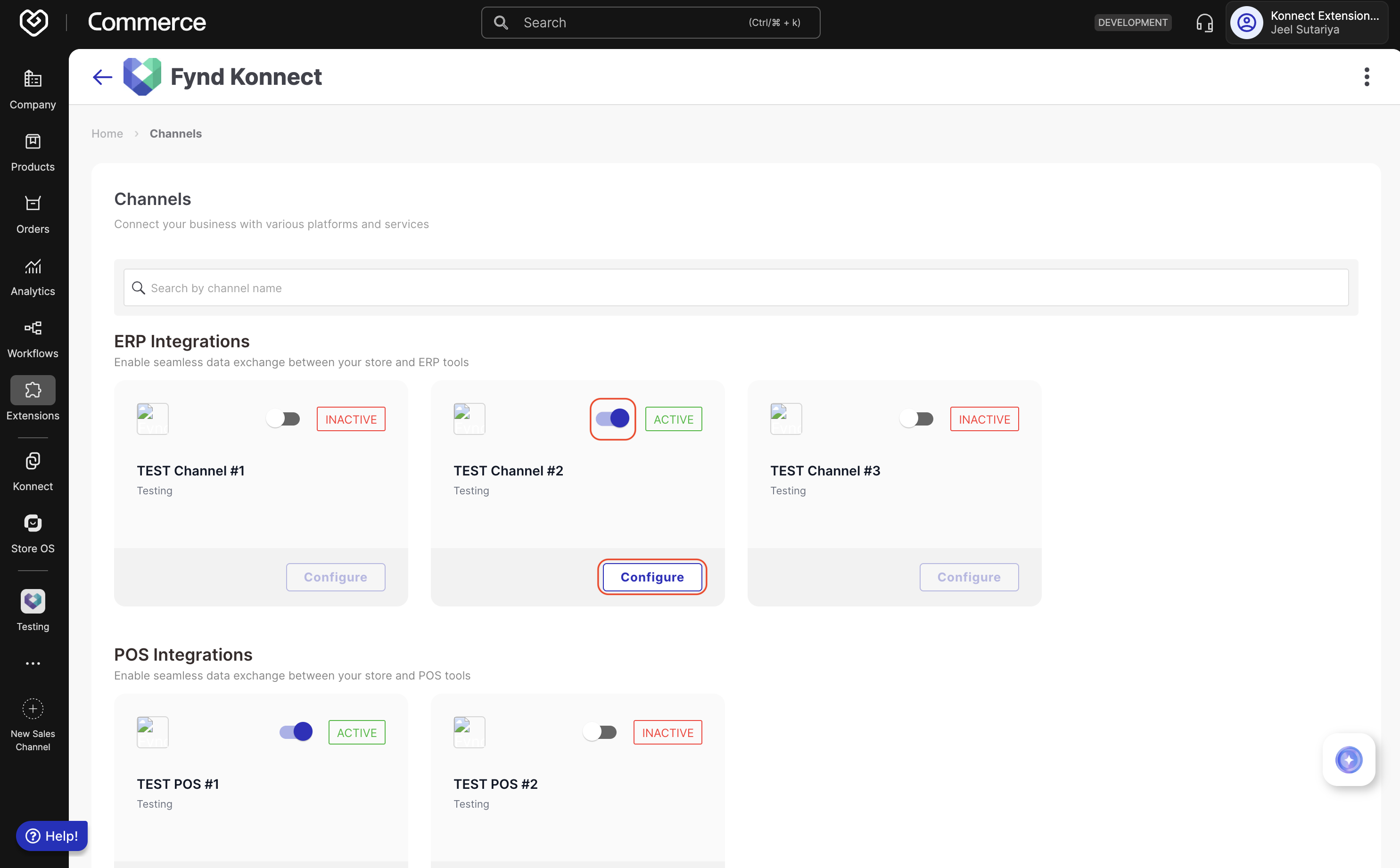
- Configure Your Channel: Identify your target channel and click the Configure button.
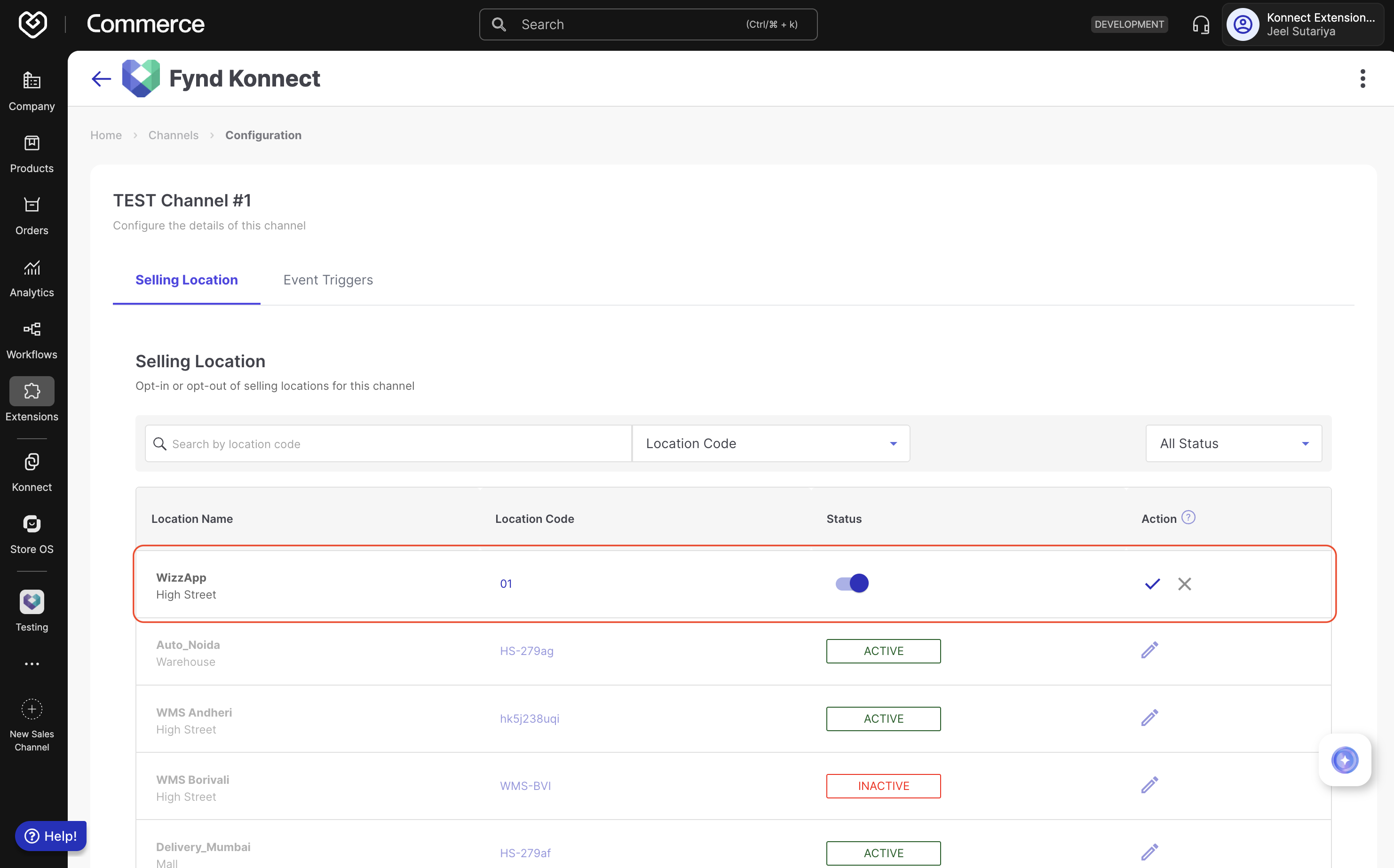
- Activate Selling Locations: In the channel configuration page, navigate to the Selling Location tab. Activate the fulfillment locations for which you want to enable event notifications. Only shipments originating from selected locations will trigger notifications.
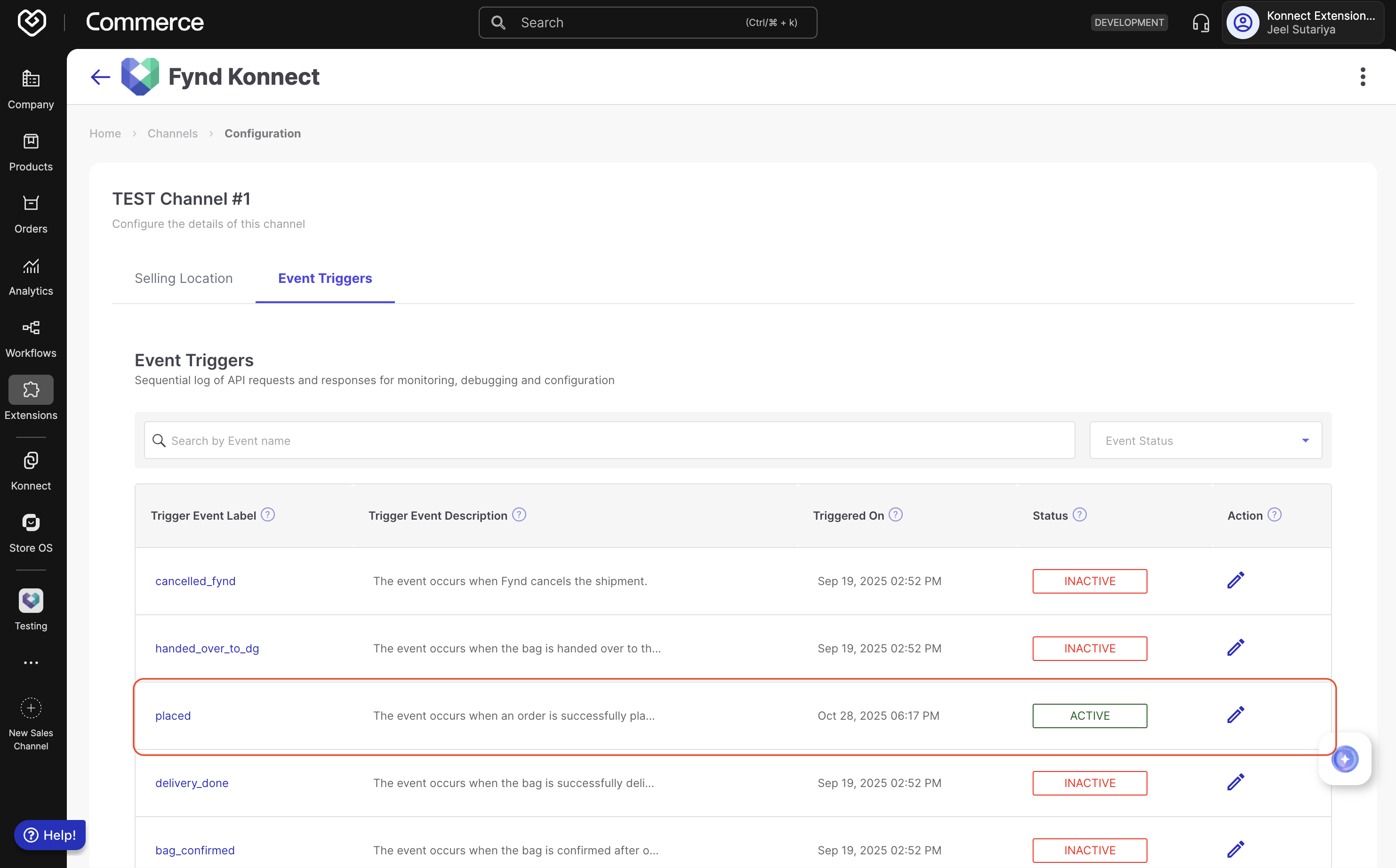
- Configure Event Triggers: Click the Event Triggers tab to view all available events. Select the event you want to subscribe to (e.g.,
placed,bag_confirmed,delivery_done).
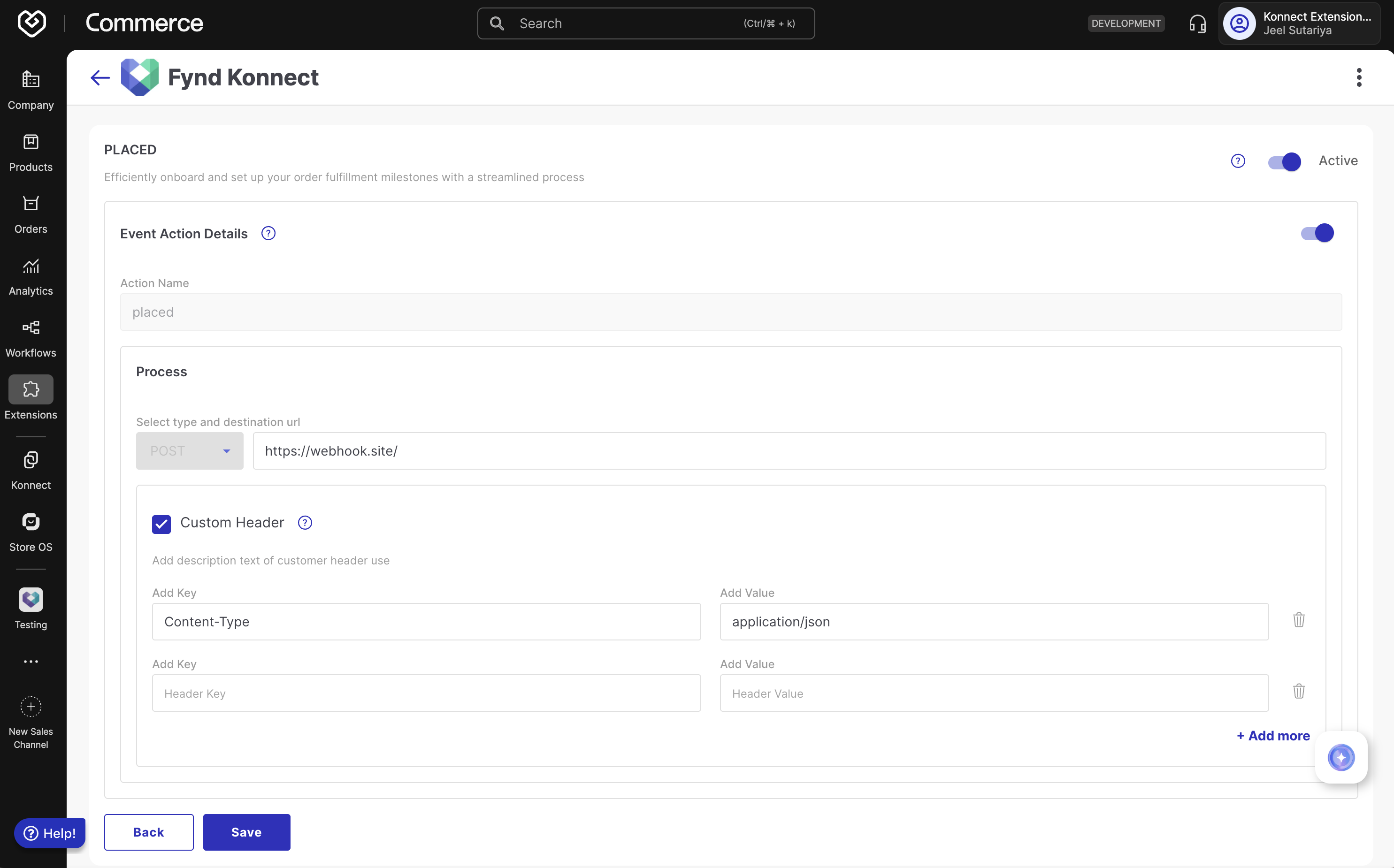
Set Up Notification Endpoint: In the event configuration screen:
- Destination URL: Enter your system's notification endpoint URL
- Custom Headers (optional):
- Enable the Custom Header checkbox if authentication is required
- Add header key-value pairs (e.g.,
Authorization: Bearer token) - Click + Add more for additional headers
- Activate: Toggle the event configuration to enable
- Save: Click Save to apply the configuration
Unique shipment identifier. Use this to track the shipment across all order operations
Forward shipment ID. Same as id for forward orders; a unique shipment ID is created for returns and cancellations
Marketplace or webstore specific order identifier generated by the sales channel
Credit note or return invoice number generated for returns/RTOs (empty for forward orders)
Current status of the entire shipment (e.g., CREATED, CONFIRMED, PROCESSING, DELIVERED, RETURN_DELIVERED)
UTC timestamp when the order was placed by the customer
UTC timestamp of the last status change for this shipment
UTC timestamp when the invoice was generated (empty if not yet invoiced)
Customer's delivery address details where the order will be shipped
Customer's billing address (same structure as shippingAddress)
Shipment-level pricing and payment details
List of product items (bags) included in this shipment
Payment method used (COD for Cash on Delivery, PREPAID for online payment)
Fulfillment mode (marketplaceFulfilled or sellerFulfilled)
Indicates if the seller has generated an invoice for this shipment
Forward invoice number (empty if not yet invoiced)
Physical package dimensions and weight information
Indicates if the shipment contains multiple packages
List of Air Waybill numbers for tracking (populated after courier assignment)
Sales channel name where the order originated (e.g., FYND, ECOMM, marketplace names)
Order journey type: forward (customer delivery) or return (return to seller)
Indicates if this is a self-ship order where seller manages logistics
Service Level Agreement - Order processing Turn Around Time deadline
Indicates if the order is locked for processing (prevents modifications)
Business transaction type (B2C for consumer, B2B for business orders)
Indicates if the shipment is tax-exempted
Additional notes or information about the shipment
Configurable (on Fynd Commerce) tags or labels associated with the shipment (e.g., Hyperlocal, Express)
Order-level tags for categorization or filtering
Available pickup time slots (for customer pickup orders)
Indicates if C-Form has been provided for inter-state B2B sales
{
  "returnInvoiceNumber": "",
  "forwardId": "17619157236111900000",
  "sellerInvoiced": false,
  "orderStatus": "CREATED",
  "fulfillmentType": "marketplaceFulfilled",
  "orderItems": [
    {
      "quantity": 1,
      "itemTags": [],
      "onHold": false,
      "productId": "FYND22940",
      "orderItemId": "46559821",
      "imeiSerialNumberNeeded": false,
      "title": "KonnectTest1234",
      "imeiSerialNumber": [],
      "returnConfig": {
        "time": 14,
        "unit": "days",
        "returnable": true
      },
      "productIdentifiers": {
        "ean": "FYND22940"
      },
      "shippingMethodCode": "STD",
      "marketplaceOrderItemId": "46559821",
      "packetNumber": 0,
      "variantId": "XL",
      "locationCode": "TEST02",
      "sku": "FYND22940",
      "orderItemPrice": {
        "couponDiscount": 0,
        "giftWrapCharges": 0,
        "sellingPrice": 1750,
        "cashOnDeliveryCharges": 0,
        "totalMarkedPrice": 2000,
        "marketplacePromotionDiscount": 0,
        "shippingCharges": 0,
        "sellerPromotionDiscount": 0,
        "discount": 250,
        "currency": "INR",
        "totalItemPrice": 1750,
        "transferPrice": 0
      },
      "gstDetails": {
        "taxPercentage": {
          "SGST": 2.5,
          "CGST": 2.5
        },
        "taxAmount": {
          "SGST": "41.67",
          "CGST": "41.67"
        }
      },
      "status": "placed",
      "customAttributes": {
        "_display": []
      }
    }
  ],
  "paymentType": "COD",
  "lockStatus": false,
  "orderBusinessType": "B2C",
  "additionalInfo": "You can add additional info here",
  "invoiceNumber": "",
  "orderPrice": {
    "orderTotalAmount": 1750,
    "codAmount": 1750,
    "currency": "INR"
  },
  "id": "17619157236111900000",
  "invoiceGenerationDate": "",
  "marketplaceOrderId": "FY6904B34B1321FD3258",
  "multiPackShipment": false,
  "orderingChannel": "TESTCHANNEL",
  "shipmentTags": [],
  "sla": "2025-11-02T24:02:04+05:30",
  "packages": [
    {
      "packageWidthCm": 34.29,
      "packageId": "P1",
      "packageLengthCm": 43.18,
      "packageWeightGms": 3000,
      "packageHeightCm": 11
    }
  ],
  "pickUpSlots": [],
  "awbNumber": [],
  "orderTags": [],
  "journeyType": "forward",
  "cFormProvided": false,
  "is_self_ship": true,
  "modifiedDate": "2025-10-31T18:32:04+00:00",
  "shippingAddress": {
    "country": "India",
    "pincode": "400093",
    "city": "Mumbai",
    "phone": "9999999999",
    "name": "John Doe",
    "addressLine1": "Fynd, WeWork Vijay Diamond",
    "state": "Maharashtra",
    "email": "test@gmail.com"
  },
  "taxExempted": false,
  "billingAddress": {
    "country": "India",
    "pincode": "400093",
    "city": "Mumbai",
    "phone": "9999999999",
    "name": "John Doe",
    "addressLine1": "Fynd, WeWork Vijay Diamond",
    "state": "Maharashtra",
    "email": "test@gmail.com"
  },
  "orderDate": "2025-10-31T18:32:04+00:00"
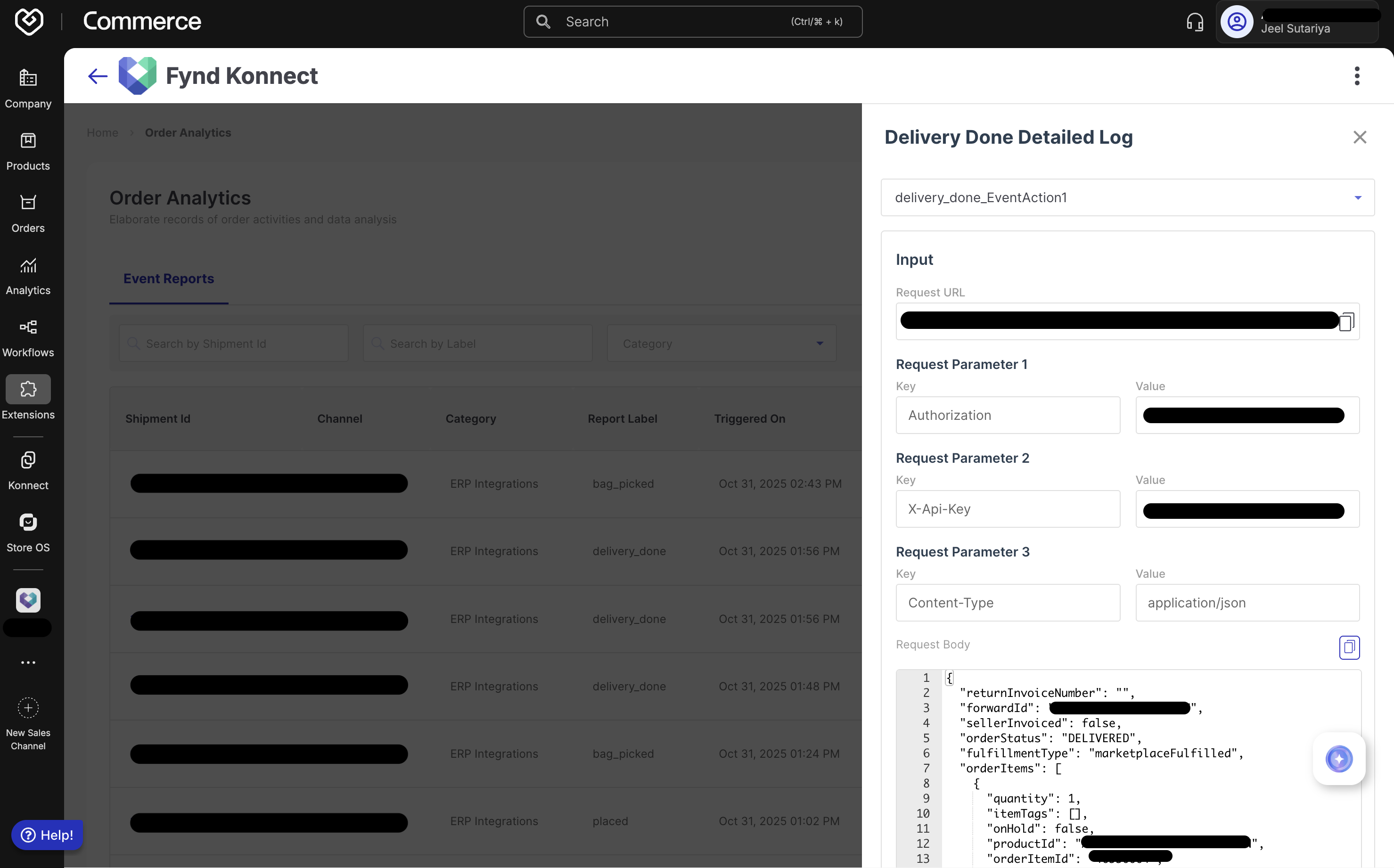
}The Order Analytics section provides comprehensive visibility into all event notifications between Fynd Platform and your integrated systems. This centralized dashboard enables you to track, troubleshoot, and analyze real-time data exchanges, ensuring quick resolution of any notification delivery issues. Event logs are retained for up to 1 month, providing sufficient historical data for debugging and audit purposes.
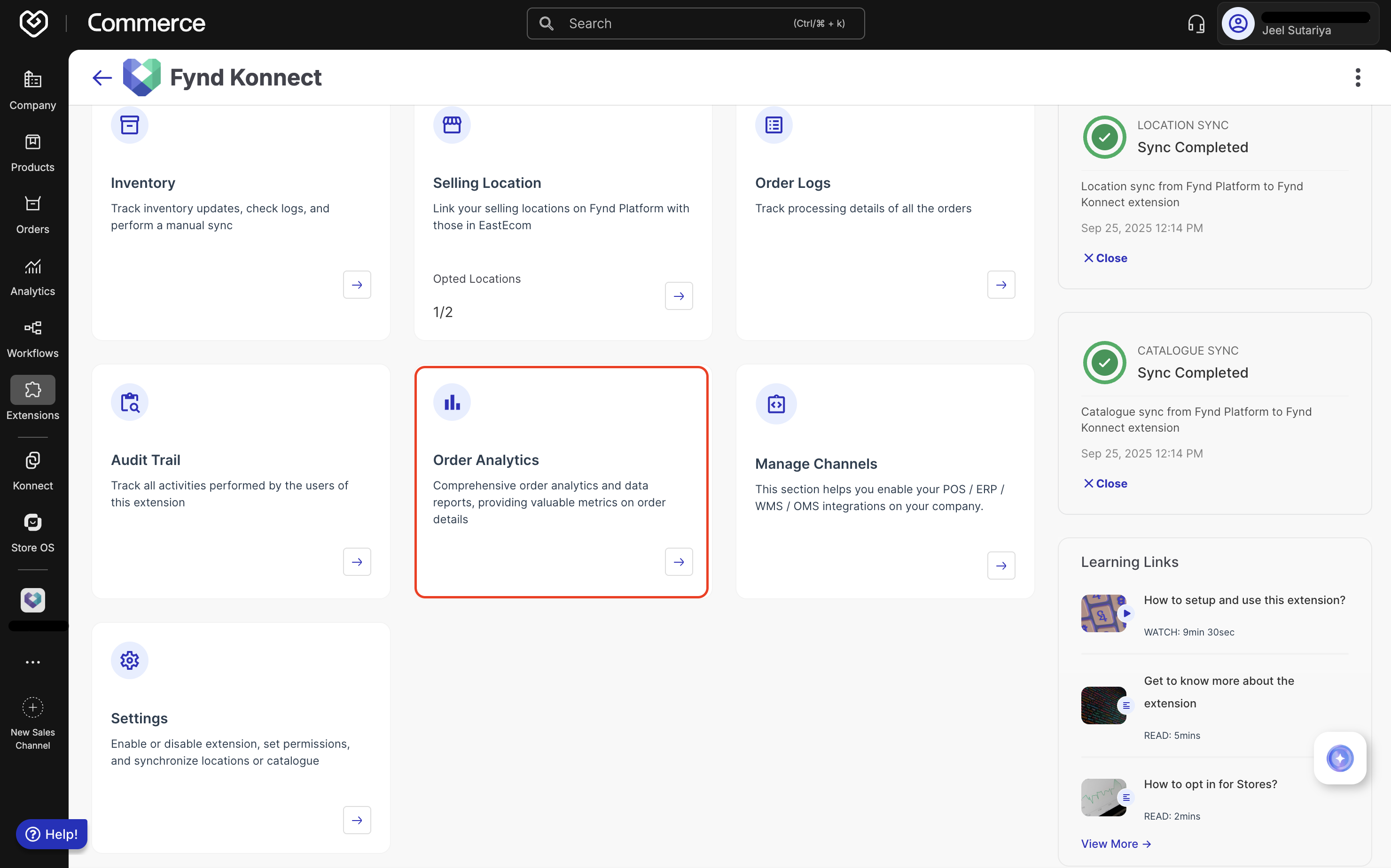
- Accessing Order Analytics: From the Fynd Konnect dashboard, click Order Analytics to access the Event Reports section where all notification activity is logged.
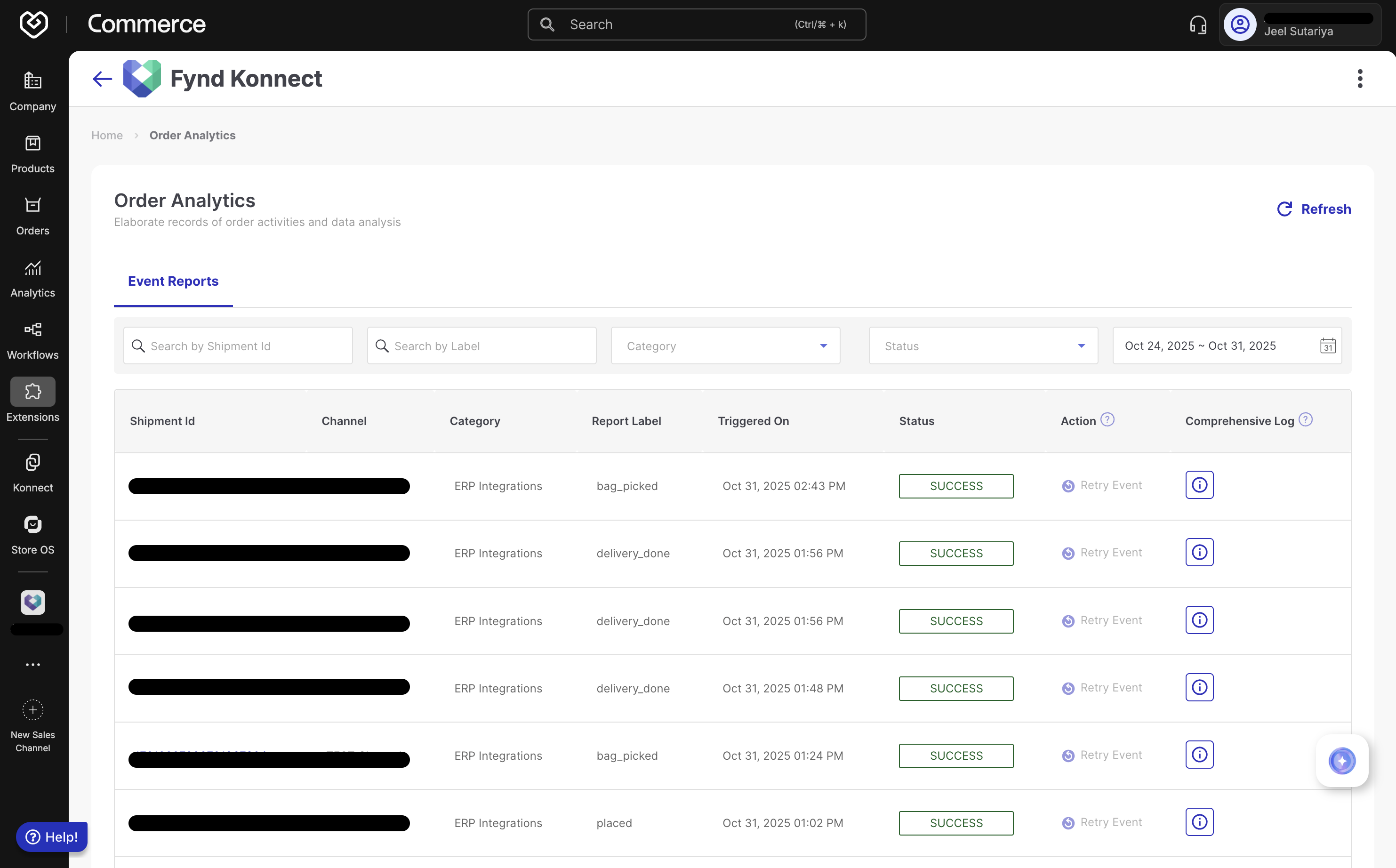
Viewing Event Reports: The Event Reports table displays all notification payloads with the following information:
- Channel: The configured integration channel (e.g., TEST Channel)
- Category: Channel type (e.g., ERP Integrations, POS Integrations)
- Report Label: Event type (e.g.,
placed,bag_picked,delivery_done)
Search and Filter Options
- Search by Shipment Id: Enter shipment identifier to view all triggered events for that shipment
- Search by Label: Filter by event name to see all shipments for a specific event type
- Category: Filter by channel category
- Status: Filter by SUCCESS or FAILED events
- Date Range: Select custom date range to narrow results
Comprehensive Log Details: Click the info icon (ⓘ) in the Comprehensive Log column for any event to view:
- Request URL: Target notification endpoint
- Request Parameters: All custom headers sent
- Request Body: Complete JSON payload sent to your system
- Response: Response received from your endpoint (visible for both success and failures)
- Status: SUCCESS or FAILED badge for quick identification
For failed notification deliveries:
- Automatic Retries: Fynd Konnect automatically retries at scheduled intervals
- Manual Retry: Click Retry Event button in the Action column to immediately resend the notification
- Exhausted Retries: If the Retry Event button is disabled, automatic retry attempts have been exhausted. Contact Fynd Support team to manually re-emit the notification
- Endpoint Reliability: Ensure your notification endpoint has high availability and responds within 5 seconds
- Idempotency: Design your system to handle duplicate notifications gracefully using the shipment
idas a unique identifier - Error Handling: Return appropriate HTTP status codes (200-299 for success, 4xx/5xx for failures) to enable automatic retries
- Security: Always use HTTPS endpoints and implement authentication via custom headers
- Monitoring: Regularly review the Event Analytics dashboard to identify and resolve delivery issues promptly