Before adding a new store, ensure that the following pre-requisites are met:
- Stock (Inventory): Required for all stores.
- POS System: Must be enabled and support B2B transactions.
- Inventory Management System (IMS): Can be the same as or different from the POS.
- Printer: Thermal or A4 printer.
- Connectivity & Hardware: Reliable internet connectivity and a desktop or laptop to process orders.
- Packaging: Must adhere to AJIO requirements.
- Product Labeling: Every product must have an EAN printed on it.
- Barcode scanner
- Power backup
Login to the Seller Portal and click on Modify Account Details.
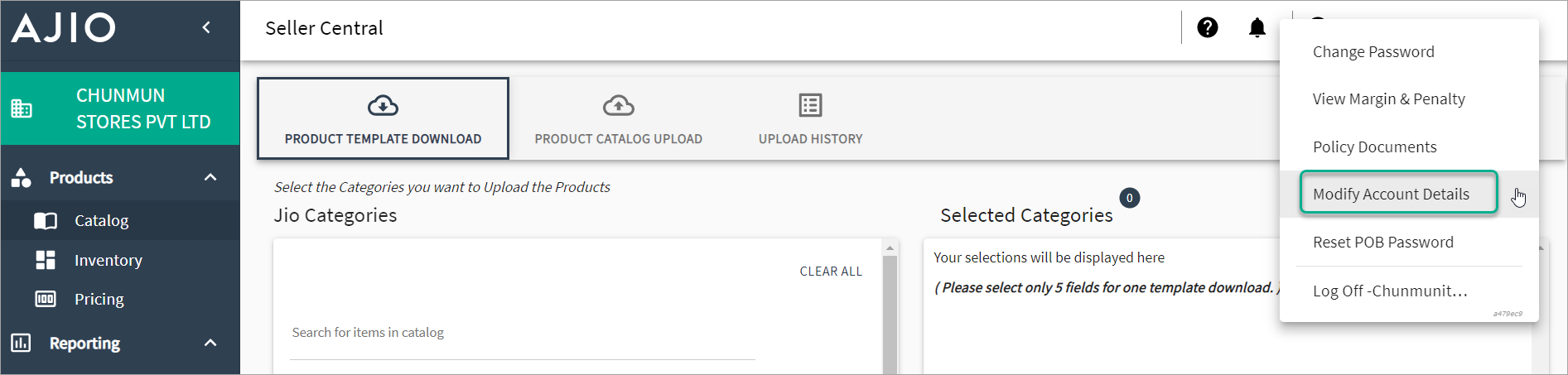
Figure 1: Modify Account Details Scroll down to the bottom of the page and click Next.
Click on the + button to add a new Place of Business.
.png)
Fill in all required information including store details, address details, address proof, GST & PAN details, bank details, invoice details, brand documents, and holiday list.
.png)
Figure 3a: Enter Store Details .png)
Figure 3b: Enter Address Details .png)
Figure 3c: Enter Banking Details .png)
Figure 3d: Enter Other Details Click Save after entering all the required information.
Once AJIO receives your details and if all information is correct, the new location will be approved within approximately 7 business days.