Commerce panel → Profile → Locations (choose a location) → e-Invoice (checkbox)
‘e-Invoicing’ or ‘electronic invoicing’ is a system in which B2B invoices and a few other documents are authenticated electronically by GSTN for further use on the common GST portal. Just like how a GST-registered business uses an e-way bill while transporting goods from one place to another. Similarly, certain notified GST-registered businesses must generate e invoice for Business-to-Business (B2B) transactions.
Currently, the e-invoicing system is already implemented for the GST-registered businesses whose aggregate turnover in any previous financial years (from 2017-18) exceeds ₹5 crore. From 1st August 2023, it shall apply to those with a turnover of more than ₹5 crore.
As e-Invoicing is required only for B2B invoices, go through all the steps below only if you are selling on AJIO Sales Channel.
STEP 1: Generate API Access credentials
- Log in to the Government portal (click here).
- On left-hand pane, click on API registration.
- Click on User Credentials.
- Click on Create API user.
- A One-Time Password (OTP) will be sent to your registered contact number. Enter the OTP to verify your identity.
- Select the Through GSP option.
- Select the GSP Name (Reliance Corporate IT Park Limited) from the drop-down, and enter a User Name and Password.
- On the top-left, click the home icon.
- Once again, select API registration, then go to User credentials, and then List of API users.
- The list may contain multiple users. Search the user you created, and copy the User ID as it is.
You can use the generated credentials for only those stores/locations that have the same GSTIN as you used to login in step a.
STEP 2: Add generated credentials to the corresponding location in Fynd Platform
- Login to Fynd Platform.
- Go to Profile
- Locations
- Click the location where you want to enable e-Invoicing.
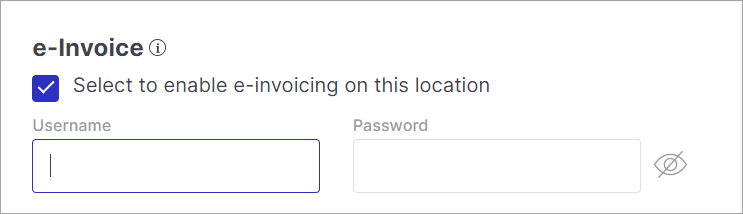
- Scroll to the bottom, click the e-Invoice checkbox, and add the generated username and password.
STEP 3: Whitelist your API username with JioGST
After adding your credentials on Fynd Platform, your API username needs to be whitelisted by JioGST before the integration goes live. You can do this in one of two ways:
- Reach out to your Fynd account manager and they will initiate the whitelisting request on your behalf
- Send an email yourself by following the steps below:
- Send an email to RJIL.TOPSServiceDesk@ril.com and Jio.TopsGST@ril.com in To, and Deepali1.Gawale@ril.com, Sudarshan.Murali@ril.com and aniketkamble@gofynd.com in CC
- Use the subject format: "BSR: GST Whitelisting request for E-Invoice API user ID of {Your Company Name}"
- In the email body, mention your company name, API username, and request whitelisting against Fynd's client ID: EINVWHGT7C41N7E4H0TJ
Once JioGST confirms whitelisting is done, your e-Invoice integration will be active.
This is a manual process on JioGST's end and may take 1-2 business days.