Commerce panel → Profile → Locations (choose a location) → e-Way Bill (checkbox)
You require an Electronic Way bill for any movement of goods. A GST registered person cannot transport goods whose value exceeds ₹50,000 (Single Invoice/bill/delivery challan) on a vehicle without an e-Way bill that is generated on ewaybillgst.gov.in. If you're selling any product whose value is greater than 50K INR, please configure the e-Way Bill. This is also applicable when you're shipping in bulk and the sum total of the shipments is greater than ₹50,000.
Registered Person – e-Way Bill must be generated when there is a movement of goods of more than ₹50,000 in value to or from a registered person. A Registered person or the transporter may choose to generate and carry eway bill even if the value of goods is less than ₹50,000.
Unregistered Person – An unregistered person is also required to generate e-Way Bill. However, where a supply is made by an unregistered person to a registered person, the receiver will have to ensure all the compliances are met as if they were the supplier.
Transporter – Transporters carrying goods by road, air, rail, etc. also need to generate e-Way Bill if the supplier has not generated an e-Way Bill.
STEP 1: Generate API Access credentials
- To generate, view, update, and cancel E-Way bills, you must allow GSP API access in the Government E-Way Bill Portal.
- Log in to the Government portal (click here).
- On left-hand pane, click on Registration.
- Click on For GSP.
- Click on Add/New.
- Select the GSP Name (Reliance Corporate IT Park Limited) from the drop-down, and enter a User Name and Password.
- Click on Add.
You can use the generated credentials for only those stores/locations that have the same GSTIN as you used to login in step b.
STEP 2: Add generated credentials to the corresponding location in Fynd Commerce
- Login to Fynd Commerce.
- Go to Profile.
- Locations.
- Click the location where you want to enable e-Way Bill.
- Scroll to the bottom, click the e-Way Bill checkbox, and add the generated username and password.
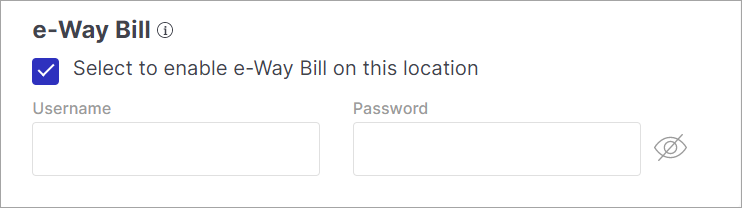
STEP 3: Whitelist your EWB username with JioGST After adding your credentials on Fynd Commerce, your EWB username needs to be whitelisted by JioGST before the integration goes live. You can do this in one of two ways:
- Reach out to your Fynd account manager and they will initiate the whitelisting request on your behalf.
- Send an email yourself by following the steps below:
- Send an email to RJIL.TOPSServiceDesk@ril.com and Jio.TopsGST@ril.com in To, and Deepali1.Gawale@ril.com, Sudarshan.Murali@ril.com and aniketkamble@gofynd.com in CC.
- Use the subject format: "BSR: GST Whitelisting request for E-Way Bill API user ID of {Your Company Name}".
- In the email body, mention your company name, EWB username, and request whitelisting against Fynd's client ID: EWBS9HVYV9UGS42QTFKV.
Once JioGST confirms whitelisting is done, your e-way bill integration will be active.
This is a manual process on JioGST's end and may take 1-2 business days.