Fynd Engage sits between Fynd sales surfaces and the loyalty provider like Nector.io. It provides one stable contract to the storefront and Store OS while handling provider selection, schema mapping, request routing, and event forwarding.
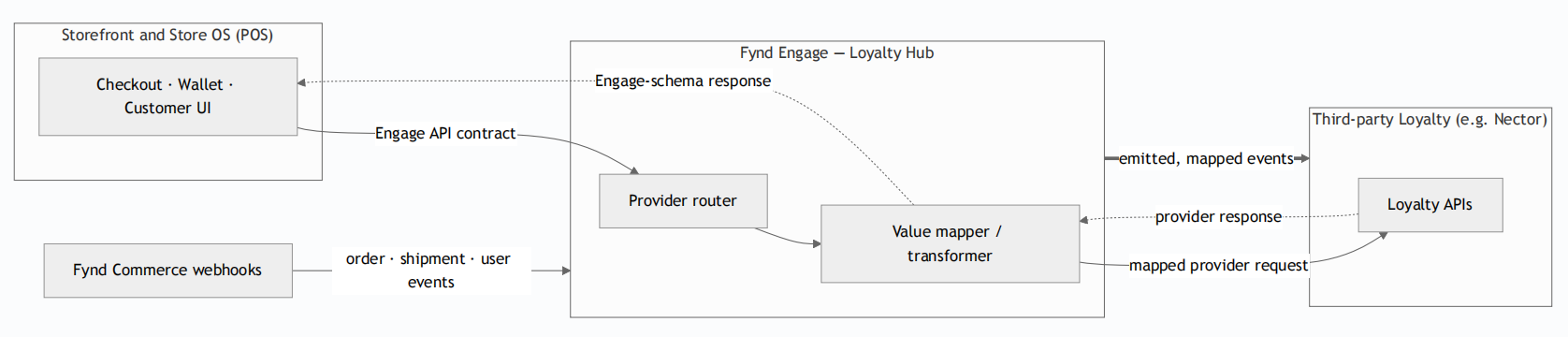
- Storefront and Store OS: Checkout, wallet, and customer interfaces call the Fynd Engage API contract.
- Fynd Engage: The provider router resolves the channel integration, then the value mapper transforms requests and responses between Engage and provider schemas.
- Third-party loyalty: The provider serves loyalty APIs and consumes mapped order, shipment, and user events.
- Fynd Commerce events: Commerce webhooks provide the order, shipment, and user events that Engage maps and emits to the partner.
- The storefront or POS calls the Engage API contract.
- Engage resolves the loyalty provider for the sales channel.
- Engage maps the request to the provider schema.
- The loyalty partner processes the request and returns a response.
- Engage validates and maps the response to the Engage schema.
- The storefront or POS receives the response.
- Fynd Commerce emits an order, shipment, or user webhook.
- Engage receives and maps the event.
- Engage emits the mapped event to the loyalty partner endpoint.
- The partner updates the applicable customer, redemption, or earn state.
For every internal platform call, Engage looks up the sales channel integration. If the provider is engage or no external provider is configured, the request continues to the native engine. For an external provider, Engage builds the partner adapter, enriches the request with the resolved customer, invokes the mapped method, and validates the response before returning it
Engage routes its search or get-customer operation to the partner customer-search API. Identity is matched by mobile number. Engage maps the returned record into its User schema, including name, email, phone, referral code, tier, and date of birth.
The wallet-balance request is served by the partner system in real time. Engage reads the available balance and returns it as an Engage wallet object. The balance is not cached or shadowed.
The order does not exist during checkout, so the cart ID is the unique reference. Engage places the redemption hold against this composite, idempotent, and reversible reference:
<salesChannelId>:<cartId>If an order-placed webhook does not arrive within the agreed window, the hold is released. The Engage native engine uses a 15-minute window. For a third-party integration, the partner owns the automatic reversion of an unclaimed hold. Engage also exposes an explicit cancel operation that reverts the hold by reference ID.
Order confirmation, delivery, cancellation, returns, and customer changes arrive as webhooks. Order-placed, shipment-update, user-create, and user-update events drive the actual confirmation, credit, and deduction of points.
Review the API contract and implement every adapter method before testing the redemption lifecycle