Categories follow a three-level hierarchy (L1 → L2 → L3) in Fynd Commerce to organize products and enhance discoverability across your catalog. Each level serves a distinct purpose:
- L1: Top-level categories
- L2: Sub-categories that group related products
- L3: Leaf categories representing the most specific product classification
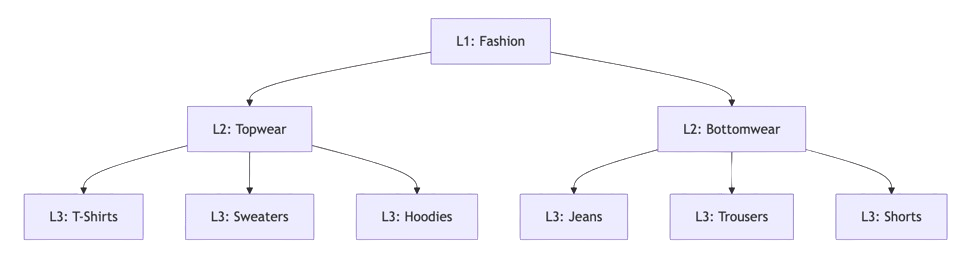
Categories are sales-channel specific, meaning L1 and L2 remain consistent across channels, while L3 names can be customized per channel to meet marketplace-specific requirements or unique business needs.
The Fetch Categories endpoint retrieves the complete category hierarchy configured for your company. Use this API to access category metadata (including IDs, names, slugs, hierarchy levels, and parent relationships) which is essential when creating products or mapping categories across different sales channels. The endpoint supports flexible querying by slug, hierarchy level, department ID, or specific L3 category IDs, along with pagination for handling extensive category trees.
Request Type:
GET
Scheme:HTTPS
Endpoint:https://{{host}}/v3/catalog/category
Try out Fynd Konnect's Fetch Categories Endpoint
Common Request Headers
| Header | Mandatory | Description |
|---|---|---|
x-access-token | Yes | Access token used for authenticating API requests to Fynd Konnect |
Content-Type | Yes | application/json |
- Prepare details: target L1/L2 parent, proposed L3 name & slug, business rationale (channels it serves), sample SKUs, and any required attributes
- Share this with your Fynd Onboarding POC (and raise a support ticket) for review
- Once created by Fynd, fetch the new category via API and update your mappings
Retrieve a category by its unique slug identifier
Filter categories by hierarchy level (1 for L1, 2 for L2, 3 for L3)
Filter categories by department ID (UID) from Fetch Departments
Comma-separated list of L3 category IDs (UIDs) to fetch multiple leaf categories in a single request
Page number for pagination (default: 1)
Number of items to retrieve per page (default: 10)
- Use
slugfor exact category lookups by slug identifier - Use
levelto retrieve all categories at a specific hierarchy level - Combine
departmentandlevelto get categories within a department at a specific level - Use
cat3_idwith comma-separated IDs to fetch multiple L3 categories efficiently - Apply pagination when dealing with large category trees (e.g., fashion or grocery catalogs)
List of categories matching the query filters
Current page number
Page size used for this response
Total number of records available matching the query
- Fynd Konnect [Sandbox]https://fyndkonnect.konnect.uat.fyndx1.de/v3/catalog/category
curl -i -X GET \
  'https://fyndkonnect.konnect.uat.fyndx1.de/v3/catalog/category?slug=string&level=1&department=0&cat3_id=0&page_number=1&page_size=1' \
-H 'x-access-token: YOUR_API_KEY_HERE'{
"items": [
{
"id": 142037,
"name": "Fruit Juices & Fruit Drinks",
"slug": "fruit-juices-and-fruit-drinks",
"level": 3,
"parent_id": 8123,
"department_id": 5957,
"path": [
{
"id": 101,
"name": "Beverages",
"slug": "beverages",
"level": 1
},
{
"id": 8123,
"name": "Juices",
"slug": "juices",
"level": 2
},
{
"id": 142037,
"name": "Fruit Juices & Fruit Drinks",
"slug": "fruit-juices-and-fruit-drinks",
"level": 3
}
]
}
],
"page_number": 1,
"page_size": 10,
"total": 420
}- Cache category data: Category hierarchies change infrequently, so implement caching to reduce API calls
- Use L3 categories for products: Always assign products to L3 (leaf) categories for maximum specificity
- Store category IDs: Save category IDs (UIDs) in your system for efficient product creation and updates
- Leverage the path array: Use the path field to build breadcrumbs and understand category relationships
- Filter by department: Combine
departmentandlevelfilters to retrieve relevant categories for specific product types - Handle pagination: Fashion and grocery catalogs can have hundreds of categories; implement proper pagination logic
- To retrieve departments for category filtering, see Fetch Departments
- To fetch templates associated with categories, see Fetch Templates
- To retrieve category-specific attributes, see Fetch Attributes by Product
- To create products with category assignments, see Create Product
- For complete catalog setup workflow, see Catalog Management Guide